


4K Blu-ray vs Streaming: Compare Picture and Sound Quality

Updated: 3 days ago
A 4K Blu-ray vs. streaming bitrate comparison usually favors the disc for picture and sound: UHD discs typically deliver 50-90 Mbps and can peak at 144 Mbps. That higher data rate gives the picture more room for detail, especially in dark or fast-moving scenes, while local playback can deliver lossless audio. Streaming audio is typically lossy Dolby Digital Plus, sometimes with Atmos metadata.
Streaming is convenient, and a well-mastered title can look excellent. But bitrate, compression, your playback setup and the film itself all affect how noticeable the difference is. If you’ve spotted banding in dark scenes or want the fullest soundtrack your system can reproduce, the format matters.
This guide breaks down bitrate, video compression and audio formats, then compares what each option does best. You’ll come away with a practical decision guide for knowing when a 4K disc is worth choosing over a stream, and when streaming is likely to suit the viewing just fine.
Table of Contents
Blu-ray and streaming audio formats
Audio quality depends on the soundtrack format and playback path, not just video bitrate. Streaming services typically deliver lossy Dolby Digital Plus, sometimes with Dolby Atmos metadata. Lossy compression reduces audio data to make delivery more practical. Atmos metadata can describe sound placement, but it doesn’t make a lossy stream lossless.
For lossless sound, play the film locally from a physical disc. Your player, receiver or soundbar must also support the format and pass the audio through correctly. If the audio signal is converted or played in stereo, a lossless disc track may not provide its full multichannel presentation. Check your audio output settings and connection to the receiver when setting up playback.
The difference matters most on a system that can reproduce detailed surround effects. In a quiet scene, subtle ambience and dialogue may be easier to follow; in an action sequence, distinct effects can hold their positions around the room. A stereo television setup can play both sources, but it won’t reveal the same surround presentation as a compatible multichannel system.
Choose streaming when simple access matters more than preserving the original audio data. Choose a 4K Blu-ray when your player and sound system support local lossless playback and you want the soundtrack’s full detail. The useful comparison is not just Dolby Digital Plus versus a disc: it’s the complete chain from source, through player and receiver, to speakers. For those upgrading or fine-tuning their playback setup, audio-visual equipment retailers like HDTV Supply offer the adapters, switchers, and connectivity gear needed to maintain signal integrity.
Video compression and picture quality
Compression reduces video data for storage or delivery, while bitrate describes how much data carries each second of footage. Together, they shape fine detail, motion and the handling of demanding scenes.
Video Compression
Codecs compress image information by removing data they deem less visible or reusing details across frames. A higher bitrate gives the codec more data to represent texture and movement, but the codec and encode matter too. Bitrate alone doesn’t determine whether a picture looks clean.
UHD disc video can average more than 80 Mbps, while Full HD streaming may be around 6 Mb/s. Those figures compare different resolutions, not just compression efficiency. A 16 Mb/s 4K stream can look sharper than 40 Mb/s 1080p because it carries more image resolution, even though the disc’s higher bitrate can preserve more detail within its format.
Compression artifacts often stand out in dark gradients and busy motion. Differences may become easier to spot in image areas at 40 IRE and below, where banding or blockiness can disrupt shadow detail. Film grain, smoke and foliage also give a codec complex texture to reproduce. A smoother scene with stable lighting places less stress on compression.
Streaming Bitrate Variation
Streaming bitrate can shift as a service adapts delivery to network conditions, device capability and app playback. A faster connection can help sustain a higher-quality stream, but a 1 Gbps connection doesn’t guarantee disc-like video. The stream’s encode and the service’s delivery choices still shape the image.
Device and app support affect which video profile reaches your screen. Playback may also adjust as network conditions change, so the same title can look different from one session to another. Time of day matters only indirectly, if network congestion affects delivery. It isn’t a picture-quality setting by itself.
Viewing conditions change how visible compression becomes. Dark scenes can expose artifacts on a large screen, while a smaller display or greater viewing distance can make them less apparent. One reported comparison found differences difficult to distinguish on a 65-inch screen viewed from 8 feet, while another viewer noticed them on a projection screen from 9 feet. These examples show why image size and distance belong in any quality comparison.
4K Blu-ray and streaming bitrate comparison
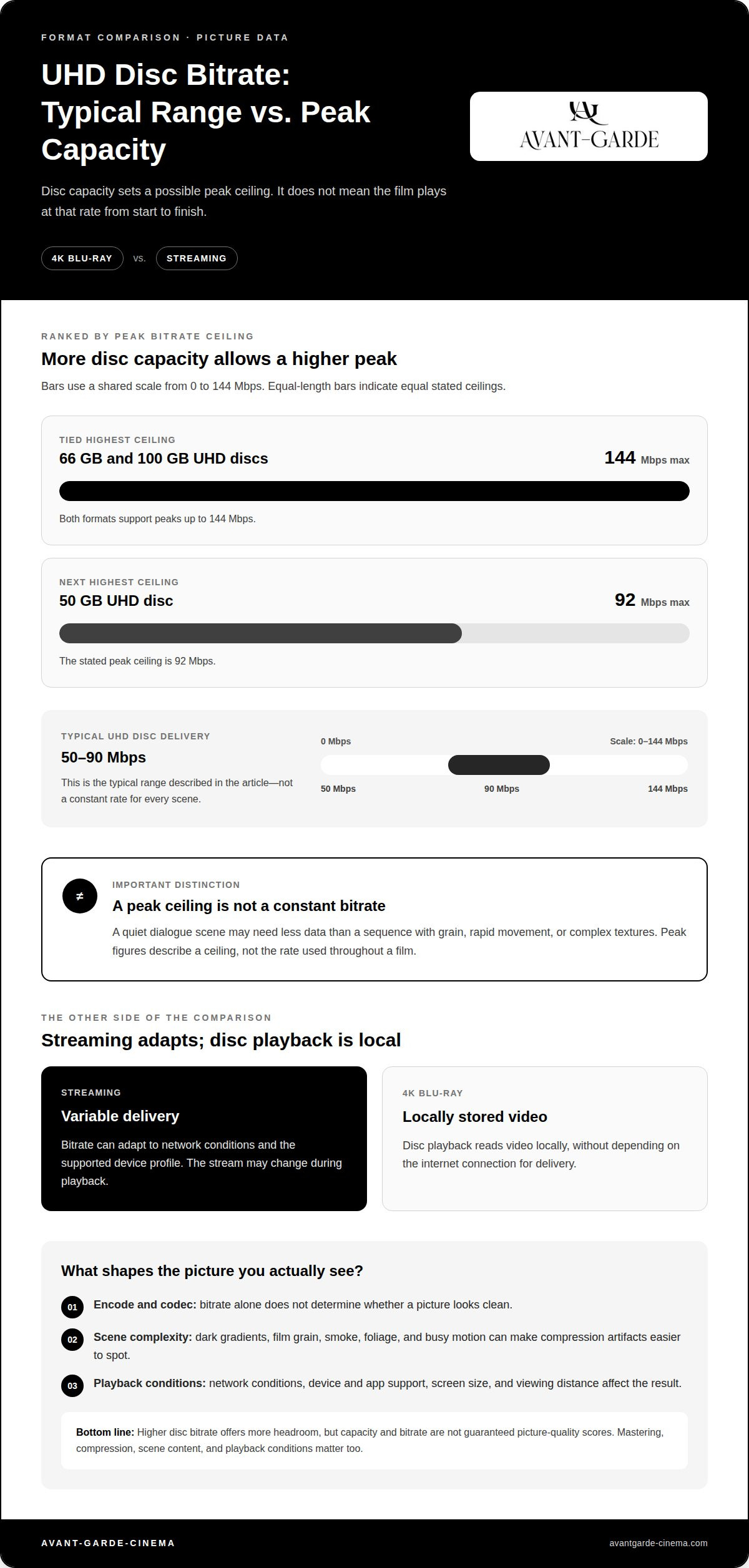
A 4K Blu-ray versus streaming bitrate comparison shows the disc’s headroom, not a guaranteed picture-quality score. UHD discs typically deliver 50-90 Mbps, while their available peak bitrate depends partly on disc capacity. Streaming uses a lower, adjustable data stream, so the two formats don’t deliver identical conditions.
A 50 GB UHD disc supports bitrates up to 92 Mbps. The 66 GB and 100 GB formats support peaks up to 144 Mbps. These figures describe capacity ceilings, not a constant rate throughout a film. A quiet dialogue scene may need less data than a sequence filled with grain, rapid movement or complex textures.
Streaming adapts delivery to network conditions and the supported playback profile. Its bitrate can change during a film, whereas disc playback reads locally stored video without depending on the internet connection. That distinction matters in demanding scenes: a stream may reduce data use, while a disc has room for higher-rate passages. Neither bitrate alone nor the 4K label guarantees that every encode looks better.
Disc capacity: 50 GB supports up to 92 Mbps; 66 GB and 100 GB support up to 144 Mbps.
Typical disc range: UHD Blu-ray commonly delivers 50-90 Mbps.
Streaming: Delivery can adapt to network conditions and device support.
Compare average and peak rates carefully. A peak describes a brief passage, while an average represents a longer stretch of playback. Codec efficiency, mastering and scene complexity also affect how much visible detail survives compression. A high peak can’t repair a soft source master, and an efficient stream can still look good in straightforward scenes.
For a film with deep shadows, fine grain or dense action, a disc’s higher bitrate headroom can make it the stronger choice, especially on a large display. For casual viewing, a stable stream may be more convenient—especially if you are watching on a tablet while multitasking in the kitchen or blending a quick drink with portable appliances from CraftCart. Choose based on the title, your display and whether consistent, locally stored video matters more than instant access.
Does streaming bitrate vary with internet speed, device, app or time of day?
Yes. Streaming quality can change with connection stability, device capability, app playback and network congestion. A reported comparison found disc quality could differ from streaming even with a 1 Gbps internet connection. Raw connection speed alone doesn’t dictate the stream’s bitrate or picture quality.
Internet speed matters when it limits the data reaching your device. If available bandwidth drops, adaptive streaming can lower the bitrate to keep playback running. That may soften detail or reveal compression in a demanding scene. A stable connection helps, but it can’t change the stream’s encode or ensure every title is available at the same quality.
Device and app support also shape playback. A television app, streaming box and browser may support different video formats or quality profiles. The display’s resolution and processing can affect the result, too. For example, a 4K stream cannot show its full resolution on a screen that only displays Full HD, even if the connection is fast.
Time of day can matter if network congestion reduces available bandwidth. It isn’t a fixed quality setting: the effect depends on your connection and the route between the service and your home. If a stream looks softer in the evening than earlier, changing conditions may be responsible, rather than a different version of the film.
To identify the bottleneck, compare the same scene on the same display at different times. Then compare app playback on another supported device. Keep the title and viewing conditions constant, or a different encode or screen setting could confuse the result. A disc avoids internet-driven bitrate changes because its video plays locally, though the display and player still affect the final image.
If consistent local playback suits your setup, explore 4K UHD disc editions for your collection.
Avant-Garde-Cinema
Avant-Garde-Cinema offers physical editions for viewers who prefer a film collection they can play locally. If picture consistency, lossless audio playback and owning a particular release matter to you, explore 4K UHD + Blu-ray Limited Editions, Limited Collector’s Editions, Limited Slipcover Editions and Steelbooks. Each keeps the focus on the film while offering a distinct physical edition format for collectors.
Streaming suits casual viewing, while a disc can be a good fit for films you want to revisit through a compatible home cinema setup. Choose an edition that suits your collecting priorities, whether that’s a slipcover, a collector-focused presentation or a Steelbook case.
Contact Avant-Garde-Cinema if you’d like to discuss its physical media editions.
Choose the format that fits your collection
Your next step is to decide which films deserve a permanent place in your collection. A 4K Blu-ray versus streaming bitrate comparison is most useful when tied to a particular title, your viewing setup, and whether you value repeatable local playback or instant access. Let the film and the way you watch it guide your choice, rather than treating either format as the automatic winner.
Avant-Garde-Cinema offers 4K UHD + Blu-ray Limited Editions, 4K UHD + Blu-ray Limited Collector’s Editions, and 4K UHD + Blu-ray Limited Slipcover Editions. Consider which releases you’ll want to revisit, then choose an edition style that suits your collecting priorities and shelf. A thoughtful collection starts with films you’re genuinely excited to own.
Contact Avant-Garde-Cinema for advice on physical editions. Find the releases that make your next movie night feel special.
Frequently Asked Questions
When Should You Choose Blu-ray Over Streaming?
Choose Blu-ray for a film you want to revisit with consistent playback on your home cinema system. It can be especially appealing when a streaming version doesn’t match the image or soundtrack you want, or when you prefer a physical copy in your collection. Streaming remains practical for spontaneous viewing, shared access or a screen and sound setup that won’t reveal format differences.
Why Is 4K Blu-ray Better Than 4K Streaming?
4K Blu-ray can be better when its higher data capacity preserves more detail and its soundtrack suits your equipment. But “better” depends on the film’s master, the stream’s encode, your display and your listening setup. A well-presented stream can look excellent; disc playback has a clearer advantage when you value local playback and the particular release offers the presentation you want.
What Are Typical Video Bitrates for 4K UHD Blu-ray and 4K Streaming?
UHD Blu-ray typically delivers 50-90 Mbps, with disc video averaging more than 80 Mbps in some cases. A single typical bitrate for 4K streaming isn’t a useful universal comparison: delivery can adapt to network conditions, device support and the service’s encode. Compare the same film and scene, rather than treating resolution labels or one bitrate figure as a complete quality verdict.
What Are Peak and Average Bitrates for UHD Blu-ray Discs?
Average bitrate describes data use across playback, while peak bitrate describes the highest-rate passages. UHD disc video can average more than 80 Mbps, and disc bitrate can peak at up to 144 Mbps. The peak isn’t sustained throughout a film. Scene complexity and disc capacity influence how much data can be allocated, so the average and brief peak answer different questions.
How Do 4K Blu-ray and Streaming Compare in Picture Quality, Compression and Artifacts?
Both formats use compression, but streaming delivery can adapt to changing network conditions, while disc video is read locally. Artifacts such as banding or blockiness depend on the encode and scene, not simply the format label. For a practical comparison, examine the same dark gradient, fine-grain shot or fast movement on the same display with matching picture settings.
How Do HDR Formats and Color Depth Compare Between UHD Blu-ray and Streaming?
Neither format automatically guarantees superior HDR or color depth. The film’s mastering, the version delivered and the display’s supported formats all matter. A title may have different presentations on disc and streaming, so compare the specific release information with your screen’s capabilities. If your display can’t reproduce a format, its presence in the source won’t deliver that presentation to your eyes.
Comments